Thursday, November 20, 2014

Generate Drawings using iLogic Webcast

Hey everyone,

Wanted to give everyone a heads up that our own Carl Smith will be hosting a webinar today and discussing using iLogic to generate Inventor drawings.

It's free and I'm sure you'll pick up at least one thing that will help you in all your automation endeavors.

Generate Drawings using iLogic Webcast

Thursday, November 20
11:00 AM Eastern Time

REGISTER NOW


In case the above link doesn't work:

http://www.imaginit.com/Events/Registration/eventid/a2w700000000FBJAA2

Thanks,
Randy

Monday, September 29, 2014

Drawing View Scale Part II

In my last post, I discussed one solution to get a drawing view scale.  That solution found the drawing view with the lowest numerical value as part of view name (VIEW1, VIEW5, etc.) and used it's scale as an iProperty of the drawing.


Another solution that my client wanted was to present all the view names and allow the user to select which view he/she wanted to represent the scale in the title block.


Like the first solution, we cycled through each sheet on the drawing and looked at the view name.  If the view name begins with "VIEW" then it was used to build a one dimensional array.  We also concatenated the view scale with the view name to satisfy the needs of seeing both the view name and the view scale.

'    Cycle thru each sheet.  Build array of View Name and View Scale.
     For Each oSheet In oSheets
         oViews = oSheet.DrawingViews
         For Each oView In oViews
             oViewName = oView.Name
             If Left(oViewName,4) = "VIEW" Then
                 oScale = oView.Scale
                 oConc = oViewName & ": @ " & oScale
                 oViewList.Add(oConc)
             End If
         Next
     Next

We then sorted the array and set a MultiValue list using that array.

'    Sort array
     oViewList.Sort

'    Set Multi-Value List from array
     MultiValue.List("ViewList") = oViewList

Next we presented an input box to the user using the MultiValue list.

'    Present Input Box for user selection
     selected = InputListBox("Select a view from the list", _
     MultiValue.List("ViewList"), oViewList.item(0), Title := "Views", _
     ListName := "View Name @ Scale")

Next we extracted the view name and view scale from the user selection.

'    Extract View Name and View Scale from user selection    
     delimpos = InStr(selected, "@")
     oSelectedView = Left(selected,delimpos - 1)
     oSelectedScale = Right(selected,Len(selected)-delimpos)

Finally, the view scale was pushed to a custom iProperty that was displayed in the drawing title block.

'    Set custom iProperty based on user selection
     iProperties.Value("Custom", "Scale") = RoundToFraction(oSelectedScale, 1/8, _
     RoundingMethod.Round) & ":1"

The full code is listed here:

'    Setting Variables
     Dim oDrawDoc As DrawingDocument = ThisDrawing.Document
     Dim oSheet As Sheet
     Dim oSheets As Sheets
     oSheets = oDrawDoc.Sheets
     Dim oView As DrawingView
     Dim oViews As DrawingViews
    
     Dim oScale As Double
     Dim oViewName As String
     Dim oConc as String
     Dim oSelectedView As String
     Dim oSelectedScale As String
     Dim oViewList As New ArrayList
    
'    Cycle thru each sheet.  Build array of View Name and View Scale.
     For Each oSheet In oSheets
         oViews = oSheet.DrawingViews
         For Each oView In oViews
             oViewName = oView.Name
             If Left(oViewName,4) = "VIEW" Then
                 oScale = oView.Scale
                 oConc = oViewName & ": @ " & oScale
                 oViewList.Add(oConc)
             End If
         Next
     Next

'    Sort array
     oViewList.Sort

'    Set Multi-Value List from array
     MultiValue.List("ViewList") = oViewList
    
'    Present Input Box for user selection
     selected = InputListBox("Select a view from the list", _
     MultiValue.List("ViewList"), oViewList.item(0), Title := "Views", _
     ListName := "View Name @ Scale")
    
'    Extract View Name and View Scale from user selection    
     delimpos = InStr(selected, "@")
     oSelectedView = Left(selected,delimpos - 1)
     oSelectedScale = Right(selected,Len(selected)-delimpos)

'    Set custom iProperty based on user selection
     iProperties.Value("Custom", "Scale") = RoundToFraction(oSelectedScale, 1/8, _
     RoundingMethod.Round) & ":1"
    
'    Update
     iLogicVb.UpdateWhenDone = True

PS - Sorry about the formatting.  I can't seem to get those extra spaces out of the sections where I've broken up the code.

Please leave a comment and let me know what you think.

Randy

"Opportunity is missed by most people because it is dressed in overalls and looks like work." - Thomas Edison

Tuesday, September 23, 2014

Drawing View Scale Part I

Even in today's CAD world, we often include and display the drawing scale in the title block.  In the past, this was more of a requirement than it is today.  Today someone on the manufacturing floor can just as easily (and more accurately) pull up the CAD model on their terminal and take measurements. There are many students in my training classes that don't even know what item is shown in the image below.

Engineer's Scale
It is a typical practice for Inventor users to display the scale of the first view created in the drawing title block.

I recently ran into a situation where the client wanted two methods to pull a drawing scale to include in the title block:

  1. Find the view name with the lowest numerical value and use its scale in the title block
  2. Present the user with all drawing views, and their scales, on a drawing and allow the user to select which view he/she wanted to represent the scale in the title block

I'll discuss the first solution in this blog post.  The solution included just a few steps.

We cycled through each sheet on the drawing and looked at each view name.  If the view name begins with "VIEW" then it was used to build an one dimensional array.  This step ensured we didn't pull views such as section or detail views.

'    Cycle thru each sheet.  Build array of View Name and View Scale.    
     For Each oSheet In oSheets
     oViews = oSheet.DrawingViews
         For Each oView In oViews    
            oViewName = oView.Name
            If Left(oViewName,4) = "VIEW" Then
                temp = Right(oViewName,1)
                oViewList.Add(temp)
            End If
         Next
     Next

We then sorted the array and pulled the view scale of the first index of the array.

'    Sort array
     oViewList.Sort
    
'    Get scale of lowest View
     oSelectedScale = ActiveSheet.View("VIEW" & oViewList(0)).Scale

The view scale was pushed to a custom iProperty that was displayed in the drawing title block.

'    Set custom iProperty based on user selection
     iProperties.Value("Custom", "Scale") = RoundToFraction(oSelectedScale, 1/8, _
     RoundingMethod.Round) & ":1"

The full code is listed here:

'    Setting Variables
     Dim oDrawDoc As DrawingDocument = ThisDrawing.Document
     Dim oSheet As Sheet
     Dim oSheets As Sheets
     oSheets = oDrawDoc.Sheets
     Dim oView As DrawingView
     Dim oViews As DrawingViews
    
     Dim oScale As Double
     Dim oViewName As String
     Dim oViewList As New ArrayList
    
'    Cycle thru each sheet.  Build array of View Name and View Scale.    
     For Each oSheet In oSheets
     oViews = oSheet.DrawingViews
         For Each oView In oViews    
            oViewName = oView.Name
            If Left(oViewName,4) = "VIEW" Then
                temp = Right(oViewName,1)
                oViewList.Add(temp)
            End If
         Next
     Next
    
'    Sort array
     oViewList.Sort
    
'    Get scale of lowest View
     oSelectedScale = ActiveSheet.View("VIEW" & oViewList(0)).Scale

'    Set custom iProperty based on user selection
     iProperties.Value("Custom", "Scale") = RoundToFraction(oSelectedScale, 1/8, _
     RoundingMethod.Round) & ":1"
    
'    Update
     iLogicVb.UpdateWhenDone = True

Next post I'll discuss the second option where we displayed the view names and scales and allowed the user to select which scale to use in the title block.

As always, leave a comment and let us know how this has helped you.

Randy

"The difference between try and triumph is a little umph." - Unknown

Friday, September 12, 2014

Searching Excel with iLogic II: Header Rows

A few blogs back, my partner in crime Carl Smith posted about searching Excel with iLogic as a means of gathering data for ever changing projects.  This has come in handy multiple times for me.


I recently had a case where a client had a very nice looking Excel file with data at the top.  This forced the column headers I was searching for down a few rows.  An example is shown to the right.

By default, the GoExcel.FindRow likes the Column that is searching for to be in Row 1 of the worksheet.

This can be changed by using GoExcel.TitleRow.  This will allow you to tell iLogic what row to start looking for column names.

Before your GoExcel.FindRow command, add:

GoExcel.TitleRow = X

Replace the X with the row your Column headings are located in.

Here is what the code section would look like:

GoExcel.TitleRow = 8
i = GoExcel.FindRow("SalesOrders.xlsx", "Header", "Part Number", "=", PartNumber)

Description = GoExcel.CurrentRowValue("Description")
Length = GoExcel.CurrentRowValue("Length")

Randy


"I have not failed. I've just found 10,000 ways that won't work.~Thomas A. Edison


Friday, June 20, 2014

Now Where Did I Put That Code? Ah, my Custom Snippets!

If you’re anything like me (and I’ll assume you are unless you randomly pick blogs to read) then you’ve been writing iLogic code for the past 3 years or so and have amassed a large amount of code.  All that code is probably sitting in various part, assembly or drawing files.

About a year ago I decided I needed to do some tidying up and figure out a way to store all my iLogic code in a manner that I could easily search, retrieve and copy the code I know I have somewhere…it does X…and I wrote it for client Y….I think.

I am still on my quest to find the perfect vehicle to do everything but I recently decided to take a closer look at the simple storage method that Autodesk already gives us, Custom Snippets.

Custom Snippets work the same as the System Snippets with the difference being they are your code.  They are an easy way to insert your own bits of code into your iLogic rule.  

Let’s say I've written a few lines of code that I’ll be using in a few different parts in my current project.

Now, there are multiple ways of getting this rule into parts.  I could put it in the template, I could use external rules, I could use the Code Injector (which is a lovely tool that you should check out if you don’t already use it).  I don’t want to argue the merits of each of these and just focus on Custom Snippets for now.

One decision to make is how you want to categorize your Custom Snippets.  You can create individual categories for specific projects, clients, code type, etc.  I prefer to create categories by either code type or client name and saving my snippets that way.

To insert a new Snippet category, right click in the Custom Snippets window and choose Insert Category.  Enter a category.  In this example I’ll be categorizing them using client names and call this one ACME.  Unfortunately you cannot create nested categories.


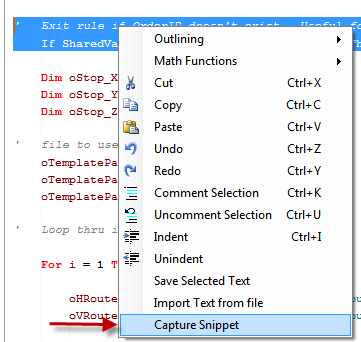
Once you’ve created a category, it’s time to start filling it up with all that helpful code you’ve already written.  Highlight the code in the Rule Editor that you want to save (I always select all the code, including empty spaces or tabs to the left so that they are captured), right click and choose Capture Snippet.  


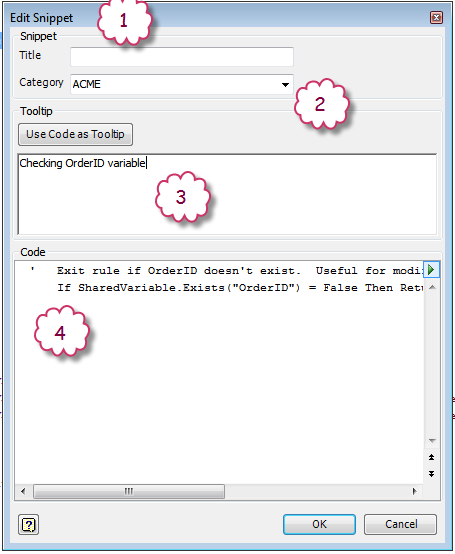
You’ll be presented with the Edit Snippet dialog box.


  1. Title of the Snippet.  This shows in the Snippets listing.
  2. Which category would you like to store the Snippet?
  3. Text entered here will show up as a tooltip when hovering over the Snippet in the Snippet listing.  I prefer a short blurb rather than using the code as the tooltip.  The code is shown at the bottom of the tooltip by default.
  4. The code you highlighted will show up here.  You can edit here but I find it easier to edit in the Rules Editor.

As my favorite knigget said “That’s easy!” 

You insert a Custom Snippet the same way as inserting a System Snippet, simply double click on it to insert it into the Rule Editor and edit as required.

A few other helpful things about Custom Snippets:
  • When deleting a Snippet Category, you’ll get asked if you want to delete the rules inside that category or move them to a Default category.
  • You can drag and drop snippets from one category to another.
  • You can merge snippets from one file to another using the tool on top of the Custom Snippets tab.
  • If you create a category but don’t put a snippet inside of it, the category will not save.
  • Use the Save and Open buttons at top to make sure everyone on your design team is pointing at the same Custom Snippets file.

I am still on the lookout for other ways of storing iLogic rules.  Ideally, something that multiple users could access and easily search for keywords and tags.  If you have any suggestions that you’d like to share, please leave a comment below.

Randy

"Challenge yourself with something you know you could never do, and what you'll find is that you can overcome anything." - Anonymous


Monday, June 16, 2014

2015 Purge Unused Parameters & iLogic Rules

With the release of Inventor 2015, we finally have an easy built-in way of purging unused parameters in both assemblies and parts.  In the Parameters dialog box is the new Purge Unused command:


Warning
This command checks to see if a parameter is used in a feature.  It does not check to see if the parameter is only being used in an iLogic rule.

Hopefully this will save you from an OOPS.

Randy

"There are only two mistakes one can make along the road to truth; not going all the way, and not starting." - Buddha


Wednesday, June 11, 2014

Placeholders on iLogic Forms

I recently had a case where a colleague was setting a custom iProperty (Program Number) to either the file name or a custom field and he was using a boolean parameter to determine which of these to use to set it.

Here is his original code:
'********************************************************
'Set Program Name

If Set_Prog_Name = True Then
    iProperties.Value("Custom", "Program Number") = ThisDoc.FileName(False) 'without extension
Else
    iProperties.Value("Custom", "Program Number") = ""
End If

'********************************************************
We can see from the original code that when Set_Prog_Name = False that the Program Number will be set to <blank>.  He needed a way to allow the end user to enter a value in the Program Number field.

My immediate response wast to set up an input box but he preferred to not have an additional dialog box.

The end solution was one to add a placeholder iProperty, which I called Program_Name_Temp, on the form in place of the original Program Number and set the value of the Program Name iProperty equal to the placeholder when Set_Prog_Name = False.  As an additional bonus, I added a controlling parameter for Program_Name_Temp which is called Set_Prog_Name_Controls.

'********************************************************
'Set Program Name

If Set_Prog_Name = True Then
    Set_Prog_Name_Controls = False
    iProperties.Value("Custom", "UserInfo2") = ThisDoc.FileName(False) 'without extension
    Program_Name_Temp = iProperties.Value("Custom", "Program Name")
Else
    Set_Prog_Name_Controls = True
    iProperties.Value("Custom", "Program Name") = Program_Name_Temp
End If

'********************************************************

I hope this helps you on a future or current project.

Randy

"Even if you're on the right track, you'll get run over if you just sit there ." - Will Rogers